


Trong các chiến dịch marketing, flash sale hoặc sự kiện, việc tạo ra sự khan hiếm bằng một chiếc đồng hồ đếm ngược kết hợp với nút kêu gọi hành động (Call to Action) là vô cùng hiệu quả.
Thay vì phải cài các plugin nặng nề làm chậm website, trong bài viết này, tôi sẽ hướng dẫn bạn cách tự code một shortcode tùy chỉnh để hiển thị nút countdown ngay trên WordPress chỉ với vài bước đơn giản.
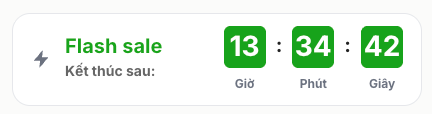
Bước 1: Thêm đoạn mã xử lý vào tệp functions.php
Đầu tiên, bạn cần thêm đoạn mã PHP và JavaScript để xử lý logic đếm ngược. Hãy dán đoạn mã sau vào tệp functions.php trong thư mục của Theme đang sử dụng (hoặc dùng plugin Code Snippets):
|
1 2 3 4 5 6 7 8 9 10 11 12 13 14 15 16 17 18 19 20 21 22 23 24 25 26 27 28 29 30 31 32 33 34 35 36 37 38 39 40 41 42 43 44 45 46 47 48 49 50 51 52 53 54 55 56 57 58 59 60 61 62 63 64 65 66 67 68 69 70 71 72 73 74 75 76 77 78 79 80 81 82 83 84 85 86 87 88 89 90 91 92 93 94 95 96 97 98 99 100 101 102 103 104 105 106 107 108 109 110 111 112 113 114 115 116 117 118 119 120 121 |
// tạo shortcode countdown add_shortcode('dgc_flash_sale', function($atts){ $atts = shortcode_atts([ 'end' => '23:59:59', // Giờ kết thúc lặp lại mỗi ngày 'title' => 'Flash sale', 'text' => 'Kết thúc sau:' ], $atts); // Chỉ chấp nhận định dạng HH:MM hoặc HH:MM:SS $end_time = preg_match('/^([01]?\d|2[0-3]):[0-5]\d(:[0-5]\d)?$/', $atts['end']) ? $atts['end'] : '23:59:59'; static $instance = 0; $instance++; $countdown_id = 'dgc-flash-sale-' . $instance; ob_start(); ?> <div id="<?php echo esc_attr($countdown_id); ?>" class="dgc-flash-sale" data-end-time="<?php echo esc_attr($end_time); ?>"> <div class="dgc-flash-left"> <svg width="22" height="22" viewBox="0 0 24 24" fill="#6b7280"> <path d="M13 2L3 14h7l-1 8 10-12h-7z"/> </svg> <div class="dgc-flash-text"> <div class="dgc-flash-title"><?php echo esc_html($atts['title']); ?></div> <div class="dgc-flash-desc"><?php echo esc_html($atts['text']); ?></div> </div> </div> <div class="dgc-flash-time"> <div class="dgc-box"> <span class="num hours">00</span> <span class="label">Giờ</span> </div> <span class="dot">:</span> <div class="dgc-box"> <span class="num minutes">00</span> <span class="label">Phút</span> </div> <span class="dot">:</span> <div class="dgc-box"> <span class="num seconds">00</span> <span class="label">Giây</span> </div> </div> </div> <script> (function () { function initCountdown() { var box = document.getElementById('<?php echo esc_js($countdown_id); ?>'); if (!box || box.dataset.initialized) return; box.dataset.initialized = 'true'; var timeParts = box.dataset.endTime.split(':'); var endHour = parseInt(timeParts[0], 10); var endMinute = parseInt(timeParts[1], 10); var endSecond = parseInt(timeParts[2] || 0, 10); function getNextEndTime() { var now = new Date(); var end = new Date(); end.setHours(endHour, endMinute, endSecond, 0); // Nếu đã qua giờ kết thúc hôm nay, chuyển sang ngày kế tiếp. if (end.getTime() <= now.getTime()) { end.setDate(end.getDate() + 1); } return end.getTime(); } var endTime = getNextEndTime(); function run() { var now = new Date().getTime(); // Tự reset khi countdown kết thúc. if (now >= endTime) { endTime = getNextEndTime(); } var diff = endTime - now; var h = Math.floor(diff / 1000 / 60 / 60); var m = Math.floor((diff % (1000 * 60 * 60)) / 1000 / 60); var s = Math.floor((diff % (1000 * 60)) / 1000); box.querySelector('.hours').textContent = String(h).padStart(2, '0'); box.querySelector('.minutes').textContent = String(m).padStart(2, '0'); box.querySelector('.seconds').textContent = String(s).padStart(2, '0'); } run(); setInterval(run, 1000); } if (document.readyState === 'loading') { document.addEventListener('DOMContentLoaded', initCountdown); } else { initCountdown(); } })(); </script> <?php return ob_get_clean(); }); |
Bước 2: Cách sử dụng Shortcode trên bài viết
Sau khi đã thêm mã thành công vào website, bạn có thể gọi shortcode này ở bất kỳ bài viết, trang (Page) hoặc khung nội dung nào trong WordPress bằng cú pháp:
Plaintext
|
1 |
[dgc_flash_sale] |
Bước 3: Thêm css vào custome css để hiển thị countdown đẹp mắt hơn:
|
1 2 3 4 5 6 7 8 9 10 11 12 13 14 15 16 17 18 19 20 21 22 23 24 25 26 27 28 29 30 31 32 33 34 35 36 37 38 39 40 41 42 43 44 45 46 47 48 49 50 51 52 53 54 55 56 57 58 59 60 61 62 63 64 65 66 67 68 69 70 71 72 73 74 75 76 77 78 79 80 81 82 83 84 85 86 87 88 89 90 91 92 93 94 95 96 97 98 99 100 101 102 103 104 105 106 107 108 |
/* contdown */ .dgc-flash-sale{ display:flex; align-items:center; justify-content:space-between; margin-bottom: 20px; padding:12px 18px; border:1px solid #e5e7eb; border-radius:18px; background:#fff; gap:20px; } .dgc-flash-left{ display:flex; align-items:center; gap:12px; } .dgc-flash-title{ font-size:20px; font-weight:700; color:#18a51b; line-height:1; } .dgc-flash-desc{ margin-top:4px; font-size:14px; color:#666; font-weight:600; } .dgc-flash-time{ display:flex; align-items:flex-start; gap:10px; } .dgc-box{ display:flex; flex-direction:column; align-items:center; } .dgc-box .num{ width:42px; height:42px; border-radius:6px; background:#16a31b; color:#fff; font-size:28px; font-weight:700; display:flex; align-items:center; justify-content:center; } .dgc-box .label{ margin-top:6px; font-size:12px; font-weight:600; color:#6b7280; } .dot{ font-size:20px; font-weight:bold; margin-top:3px; color:#222; } @media(max-width:767px){ .dgc-flash-sale{ align-items:flex-start; } .dgc-flash-title{ font-size:15px; } .dgc-box .num{ width:30px; height:30px; font-size:15px; } } .dgc-bestseller-section__title-row { display: flex; min-width: 0; align-items: flex-start; gap: 5px; } .dgc-bestseller-section__title-icon { width: 38px; height: 38px; flex: 0 0 38px; color: #60bb46; margin-top: 5px; } h2#dgc-bestseller-title { margin: 0; color: #111827; font-size: clamp(25px, 3.5vw, 30px); font-weight: 700; line-height: 1.1; letter-spacing: 0; text-transform: uppercase; } @media (max-width: 640px) { h2#dgc-bestseller-title { font-size: 18px; } } |
Giải thích các thuộc tính (Attributes):
-
time: Thời gian kết thúc đếm ngược (định dạng:Năm-Tháng-Ngày Giờ:Phút:Giây). -
link: Đường dẫn liên kết khi người dùng bấm vào nút. -
text: Nội dung chữ hiển thị trên nút bấm. -
expired_text: (Tùy chọn) Câu thông báo hiển thị khi đồng hồ chạy hết giờ.
Lời kết
Chỉ với một đoạn mã ngắn gọn tích hợp cả HTML, CSS, JS và PHP, bạn đã có thể tự tạo một tính năng đếm ngược chuyên nghiệp cho website WordPress của mình mà không cần tốn chi phí mua plugin. Chúc các bạn áp dụng thành công và nâng cao tỷ lệ chuyển đổi cho website!

Bình luận bài viết
Gửi phản hồiChưa có bình luận nào cho bài viết này.